One student record, everywhere
Enrollment status, department, fees, attendance, exams, library loans, and transport all reference the same academic identity.


THE WIND
Campus OS
Replace scattered spreadsheets, WhatsApp groups, and disconnected tools with a single system that principals, teachers, accountants, HR, librarians, and transport teams actually want to use.
Academic core
Students, faculty, timetable, attendance
Back office
Fees, expenses, HR, leave, payroll
Campus services
Library loans, fleet, notices
Digital growth
Website, Meta & Google Ads, SEO
11+
Core modules
From classroom to accounts
8+
Campus roles
Permissioned for every team
1
Source of truth
Students, fees, exams, staff
24/7
Campus readiness
Always-on operations
The problem we solve
Most institutions juggle attendance registers, fee Excel sheets, exam notices on chat, library cards in drawers, and payroll in a separate HR product. Data drifts. Approvals stall. Parents and students wait. THE WIND ERP was designed so every department shares the same students, the same permissions, and the same operating rhythm — without forcing a one-size-fits-all spreadsheet mindset onto a living campus.
Enrollment status, department, fees, attendance, exams, library loans, and transport all reference the same academic identity.
Leave requests, expense approvals, notice publishing, payroll runs, and result publishing move through clear statuses with the right roles in control.
Searchable data tables, filters, detail drawers, and role-aware dashboards reduce the friction of everyday campus administration.
How institutions adopt Wind
Configure branding, campuses, departments, and academic structure. Invite leaders with the right roles from day one.
Load students and faculty, map courses, build timetables, and open fee structures for the academic year.
Mark attendance, collect fees, publish notices, issue library loans, assign buses, and prepare exam schedules.
Use reports and dashboards to see collections, staffing, academic progress, and operational bottlenecks — then act.
Platform principles
Academics, money, people, and logistics share one secure identity model so information never has to be re-typed between departments.
Principals see everything. Accountants see finance. Exam controllers see examinations. Permissions are product features, not afterthoughts.
Whether you run a K-12 school, a college, or a multi-campus university, Wind scales from a single campus to a networked institution.
Designed for busy operators — clear navigation, polished tables, profile drawers, and intentional motion — not another cluttered admin panel.
Select a module to see who uses it, what outcomes it unlocks, and the day-to-day work it covers — all sharing the same students, staff, campuses, and permissions.
Module index
A role-aware command center that shows what matters today — enrollments, collections, attendance, exams, and campus activity — without drowning leaders in noise.
Outcomes
Who uses it
Principals and admins open Wind to a living picture of campus health. KPI cards, enrollment trends, fee graphs, upcoming events, and notice feeds surface the decisions that need attention now.
What you manage
Define who you are as an institution — then extend that identity across one campus or many.
Outcomes
Who uses it
Wind starts with the institution itself: legal name, branding, academic configuration, and campus hierarchy. Multi-campus schools keep a primary campus while still operating sister sites under one tenant.
What you manage
The academic core — students, faculty, departments, courses, timetable, and attendance — designed as connected records, not siloed lists.
Outcomes
Who uses it
Academic life is the heart of Wind. Student lifecycle statuses, faculty designations, department ownership, course catalogues, day-wise timetables, and attendance sessions all work together so a registrar and a teacher share the same truth.
What you manage
Plan exams, schedule papers, generate hall tickets, capture marks, and publish results with grading integrity.
Outcomes
Who uses it
Exam seasons are high-pressure. Wind gives controllers a structured path from defining an exam and grading scheme, to paper schedules and invigilators, to hall tickets, marks entry, grade points, and analytics — without losing the audit trail.
What you manage
Design fee structures, raise invoices, record payments with receipts, and control campus expenses.
Outcomes
Who uses it
Finance teams need clarity more than dashboards. Wind models fee components, student invoices, payment receipts, vendors, and expenses so outstanding dues and today’s collections are always visible — and always tied back to the student or department.
What you manage
Treat campus staff as first-class citizens — directory, leave, salary structures, and payroll runs.
Outcomes
Who uses it
Schools are people-heavy organisations. Wind covers employee onboarding, leave types and approvals, salary structures, payroll period runs, and payslips so HR and finance stay aligned on who is paid, for what, and when.
What you manage
Catalogue titles, track copies, issue loans, and handle returns, overdues, and lost books.
Outcomes
Who uses it
The library stays connected to student identities. Librarians manage catalogue metadata and shelf location, issue loans against student accounts, and close the loop with return, overdue fine, and lost-book workflows.
What you manage
Operate the fleet — vehicles, drivers, route stops, and fares — as a managed campus service.
Outcomes
Who uses it
Transport is often the most operationally messy department. Wind keeps vehicle status, driver assignment, route sequences, and stop fares in one place so morning dispatch is planned, not improvised.
What you manage
Draft, publish, and archive campus notices to the audiences that need them.
Outcomes
Who uses it
Important messages should not depend on who is in which WhatsApp group. Wind supports draft-to-publish notice workflows with audience targeting for all, students, faculty, staff, or parents.
What you manage
Secure the platform with users, roles, permissions, and cross-module reporting.
Outcomes
Who uses it
Governance is part of the product. Super admins manage users and roles, tune the permissions matrix, and open reports that summarise academic, finance, HR, library, and transport health.
What you manage
The same platform continues into admissions, curriculum depth, live transport, events, inventory, and more.
Outcomes
Who uses it
Wind is built as a complete school and university management vision — not a dead-end MVP. The roadmap extends into admissions funnels, academic sessions and sections, curriculum and homework, live bus tracking, events, assets, visitors, and campus web presence.
What you manage
THE WIND is not only your campus operating system. Our team handles end-to-end digital marketing, website development & maintenance, paid ads across Meta and Google, and Google ranking — so admissions and reputation keep compounding while the ERP runs the campus.
Strategy, campaigns, creatives, and messaging that attract parents, students, and partners — aligned with your institution’s brand.
Modern, fast campus websites built to convert enquiries — admissions, programmes, events, and trust signals front and centre.
Ongoing updates, security, content changes, uptime, and performance so your digital front door never goes stale.
Paid acquisition on Meta and Google — search, display, and remarketing tuned for admissions seasons and brand reach.
Social ads and content engines across Instagram, YouTube, and Facebook to keep your campus visible where families already scroll.
Technical SEO, local ranking, and content that helps your institution show up when parents search for schools and colleges.
Channels we run
Pair THE WIND ERP with a marketing engine that fills seats — not just manages them.
Choose Digital Marketing for admissions growth, or the Complete ERP plan for full school operations — with website, apps, marketing support, and dedicated team included.
We help you attract more admissions, build your brand, and stay ahead of competitors.
What's included
Benefits for your school
Our approach
A powerful ERP to automate and manage your entire school operations in one place.
Modules included
Everything included — no extra charges
Monthly technology workshops
Two full-day workshops every month on emerging technologies like AI, robotics, programming, cyber security, digital skills, entrepreneurship, and more — conducted by THE WIND ERP Team.
Dedicated team
Our development & support team works exclusively on your school. Custom requirements and development are included in the plan with no extra charges.
A day inside Wind
Search a student, confirm batch and department, check fee balance, verify attendance trend, and open the profile drawer — without leaving the academic workspace.
Open fee structures, raise or find invoices, record payments with receipts, and watch today’s collections update on the finance summary.
Create the exam, schedule papers, generate hall tickets, collect marks, publish results, and review pass analytics in one examination lane.
Approve leave, confirm salary structures, run payroll for the period, and review payslips before finance disburses.
Before Wind vs with Wind
Without Wind
With THE WIND ERP
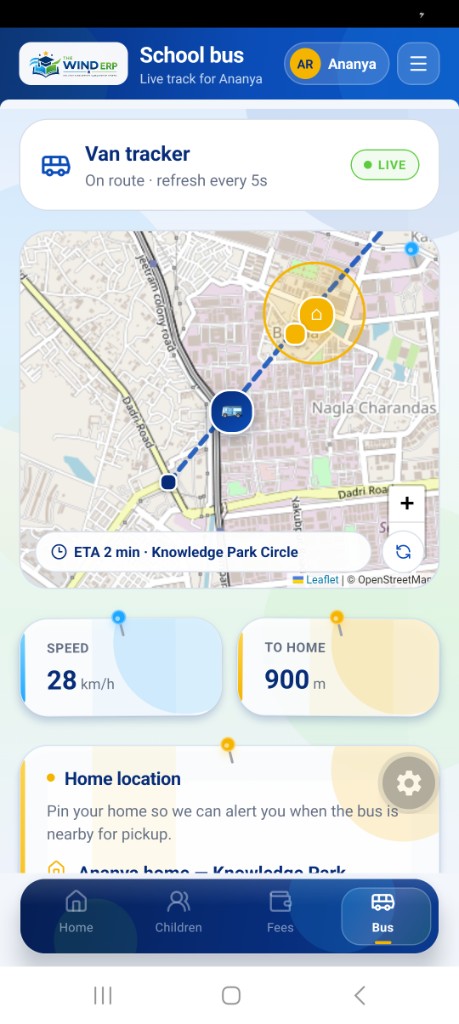
THE WIND ERP Parent app gives guardians a calm, notebook-style login and a live dashboard for attendance, fees, homework, leave, messages, and school-bus tracking — with one-tap switching when they have more than one child.
First look
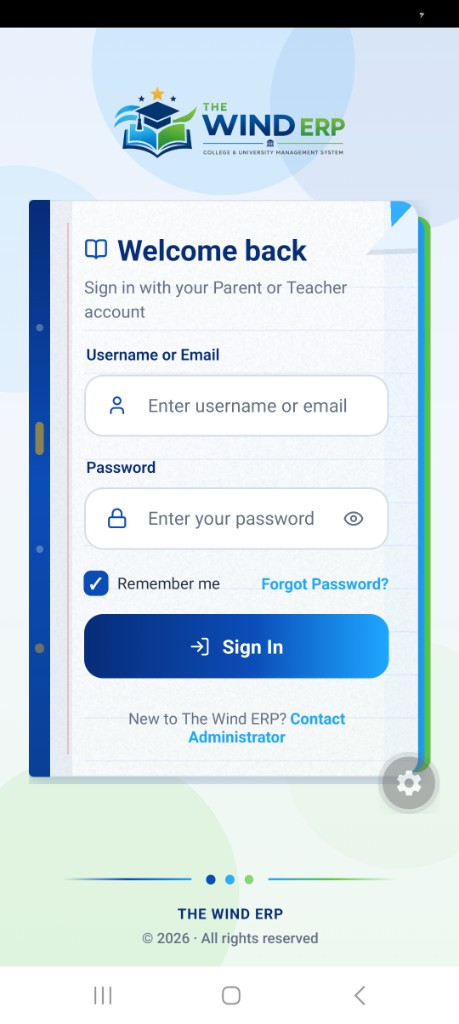
Welcome back — Parent portal sign-in
Parents open the same THE WIND ERP notebook login as teachers, choose Parent, sign in with their institution account, and land on a home feed with fee dues, attendance risks, today’s classes, and quick actions.
Live home dashboard
See alerts, monthly attendance, pending fees, today’s present/absent marks, and upcoming classes for the active child.
Multi-child switching
Tap to switch between siblings. The whole app — fees, bus, homework, leave — follows the selected student.
Fees at a glance
Current due, paid-to-date totals, and fee plans by academic year. Online UPI/card payment is designed into the flow.
Live school bus
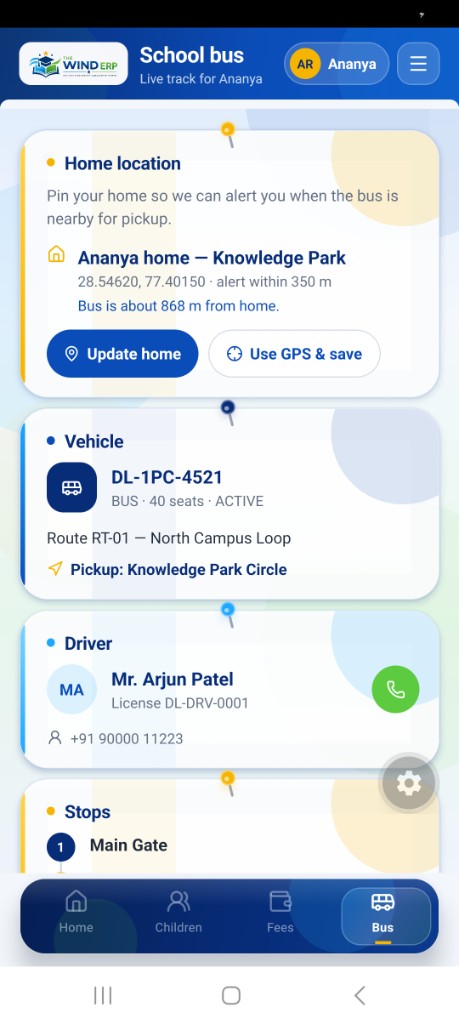
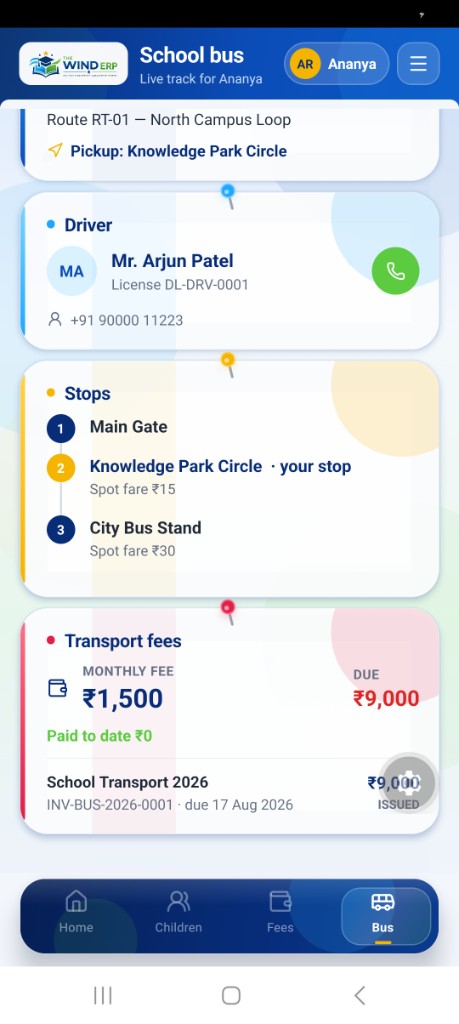
Pin home, watch ETA and distance, see driver contact, route stops, and transport fee status on a live map.
Everyday campus tools
Attendance history, homework, leave requests, teacher messages, library, and health records from one navigation drawer.
Secure & institution-linked
Accounts are issued by the school. Parents only see children and data they are authorised to access.
Available for Android · Parent & Teacher experiences in one THE WIND ERP app
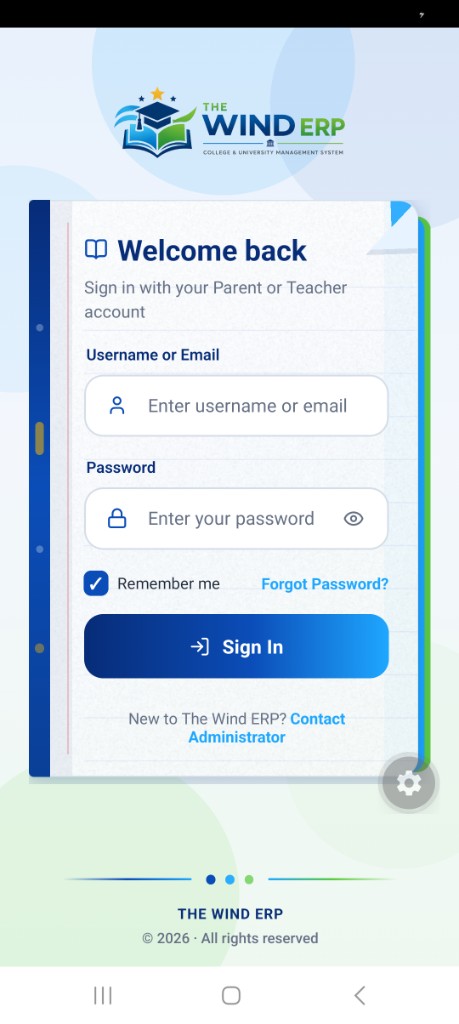
Login · First look
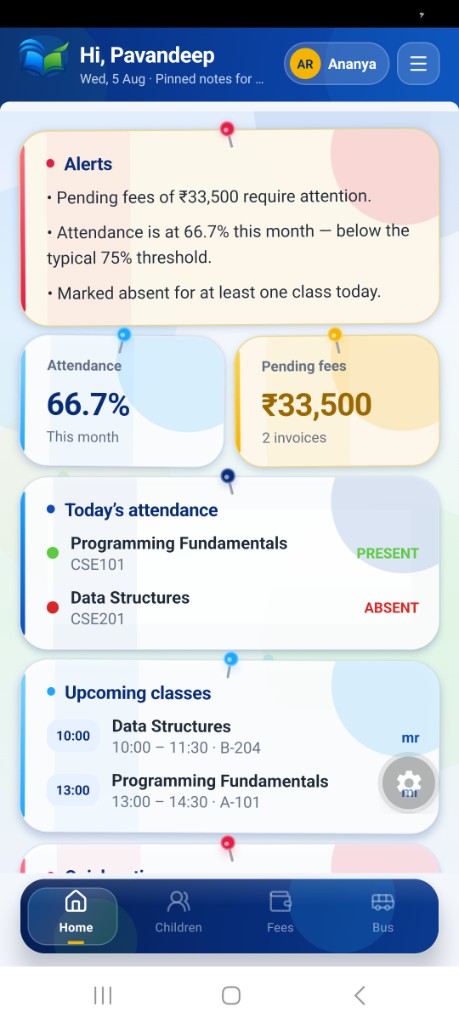
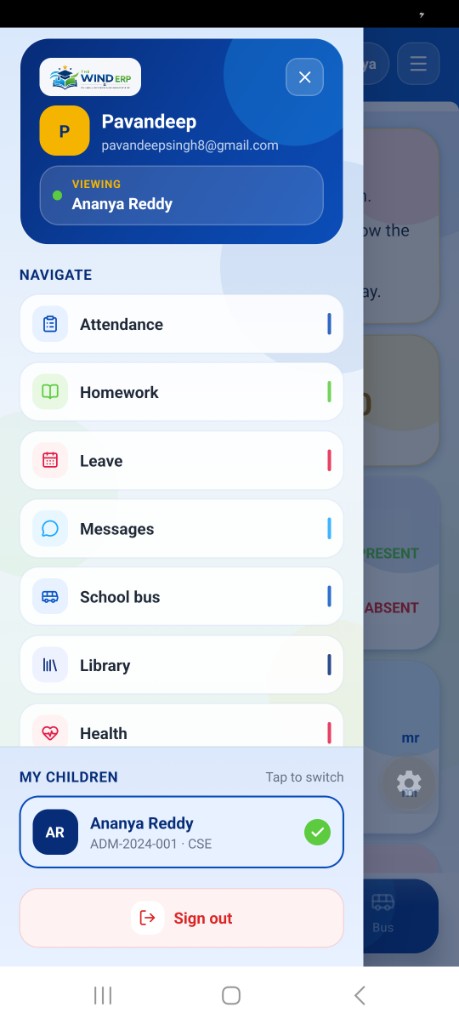
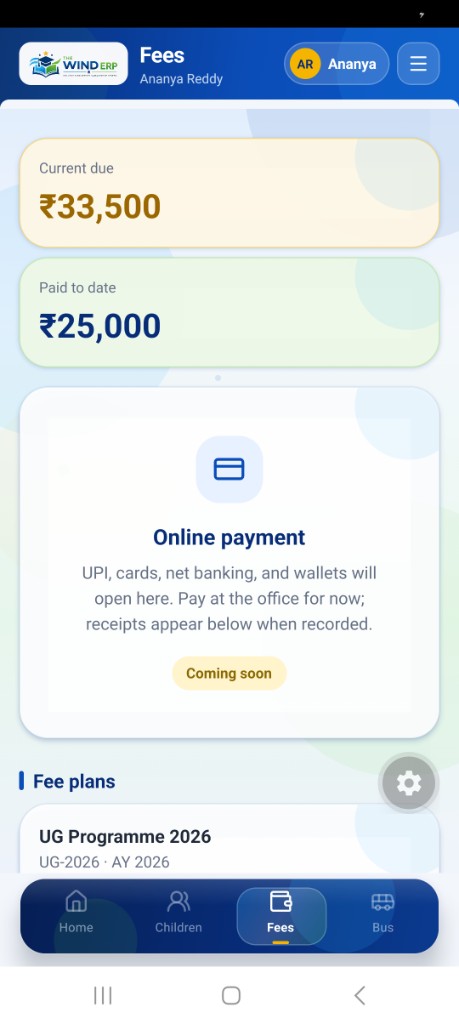
Login · Shared with Parent
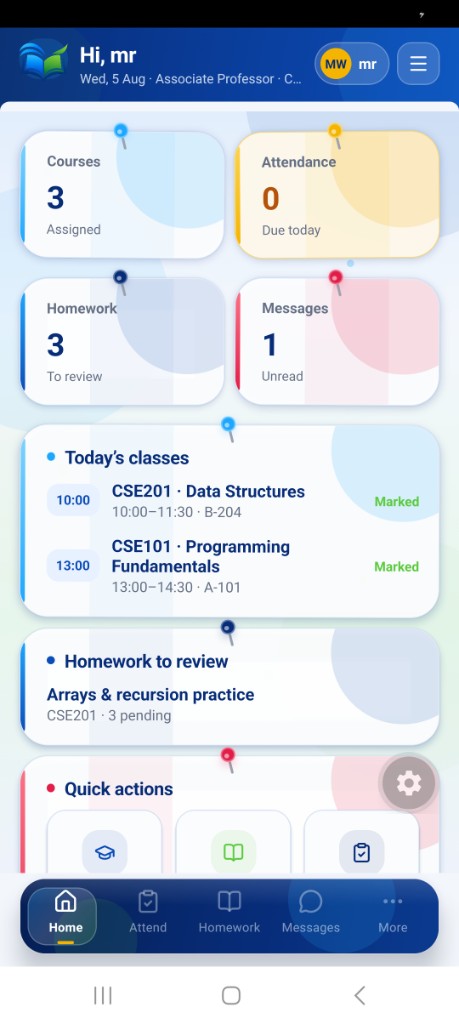
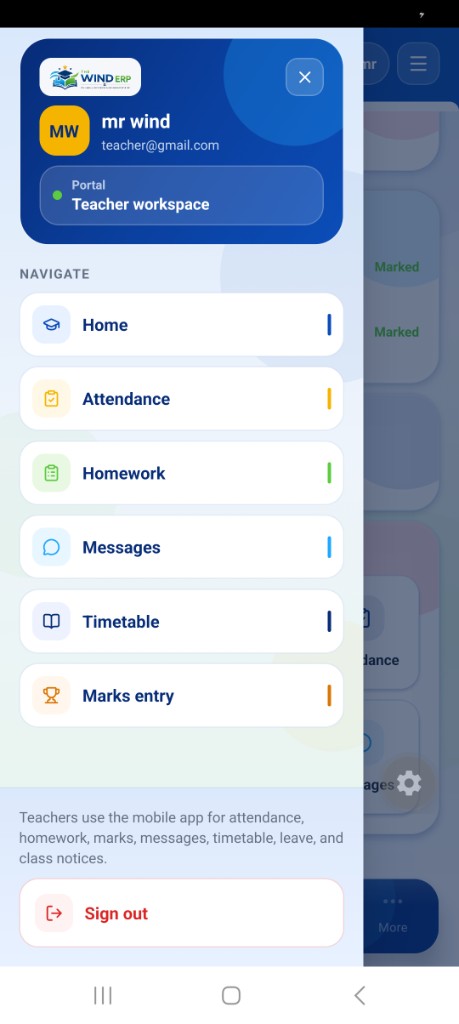
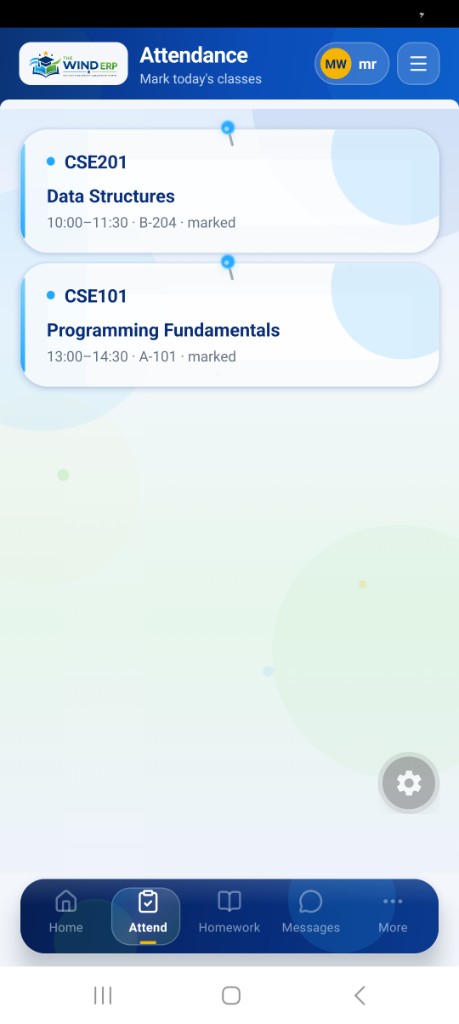
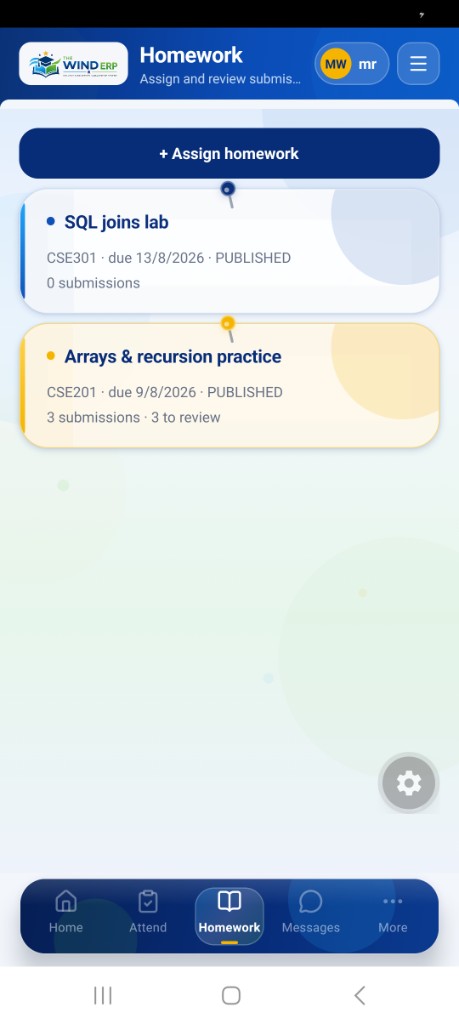
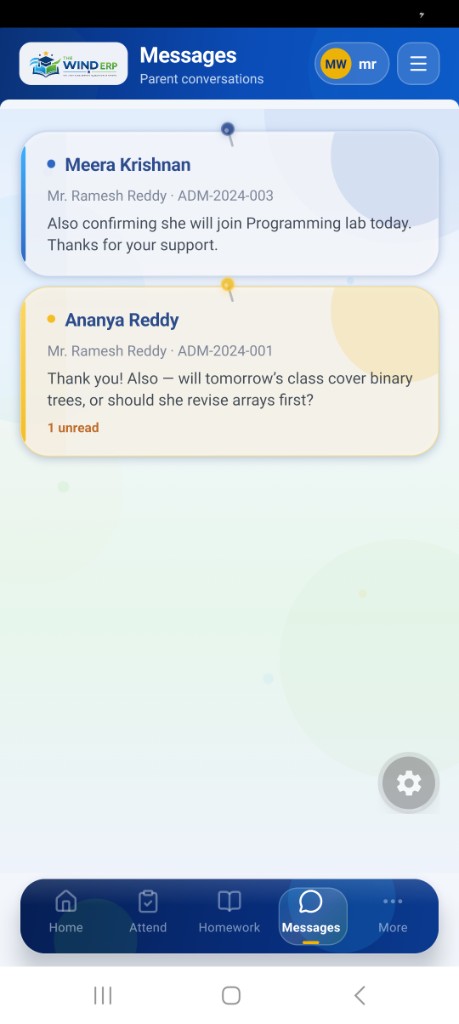
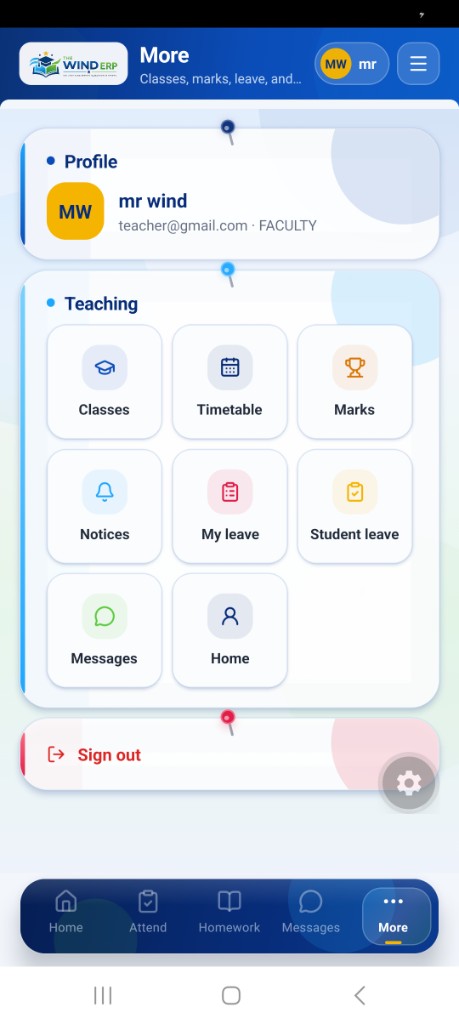
Teachers sign into the same THE WIND ERP app and land in a dedicated Teacher workspace — mark attendance, assign and review homework, message parents, enter marks, manage leave, and publish class notices without opening a desktop.
First look
Same notebook login — Teacher portal opens next
Teachers use the same lined-paper THE WIND ERP login as parents. Choose Teacher, sign in with a faculty account, and land on today’s classes, attendance due, homework review, and parent messages.
Attendance in two taps
See today’s classes with time, room, and marked status. Open Attend to take the roll for the session you are walking into.
Assign & review homework
Publish labs and practice sets, track submissions, and jump straight to items that still need review.
Parent conversations
Read and reply to guardian messages tied to each student — context like admission number stays on the thread.
Marks, timetable & notices
Enter marks, check the teaching timetable, and publish class notices from the More / Teaching grid.
Leave for staff & students
Apply for your own leave and review student leave requests without leaving the mobile workspace.
One app, teacher portal
Faculty accounts open the Teacher workspace automatically — parents never see teaching tools, and teachers never see sibling fee dashboards.
Same login as Parent · Faculty & HOD · Attendance · Homework · Marks

Built for every campus role
Institution setup, oversight, users, permissions, and cross-campus visibility.
Departments, courses, timetable, attendance, and examination collaboration.
Fee structures, invoices, payments, expenses, and collection insight.
Employees, leave approvals, salary structures, and payroll runs.
Catalogue health, loans, returns, fines, and circulation status.
Fleet readiness, drivers, routes, and stop-wise fares.
Schedules, hall tickets, marks entry, results, and analytics.
Portal-ready access for learning updates, notices, and campus services.
FAQ
Two clear packages: Plan 1 is Digital Marketing for Schools (SEO, ads, social, website, leads, reporting). Plan 2 is the Complete School ERP Solution with full modules plus website, apps, hosting, marketing support, workshops, and a dedicated team — with custom work included.
No. Alongside THE WIND ERP we handle campus marketing, website development and maintenance, Meta and Google Ads, Instagram / YouTube / Facebook campaigns, and Google ranking (SEO) so admissions growth and campus operations stay under one partnership.
No. It is designed for schools, colleges, and universities — from single-campus institutions to multi-campus networks that need shared governance.
Yes. Users, roles, and a permissions matrix control who can read, create, approve, or publish inside each module.
Yes. Academics, examinations, finance, HR, library, transport, and communication all live in the same product with shared student and staff identity.
Operators use dashboards and reports daily, while the roadmap continues into admissions depth, curriculum tooling, live transport, events, and more campus services.
WhatsApp us instantly, email the team, or visit our Khanna headquarters — we are ready when your campus is.
Send a query
Share your school or university details and we will follow up about THE WIND ERP, Parent & Teacher apps, or Growth Studio.
HQ · Khanna, Punjab
30.72°N · 76.21°E
Explore dashboards, academic records, examinations, finance, HR, library, transport, and communication — designed as one product, not a pile of portals.